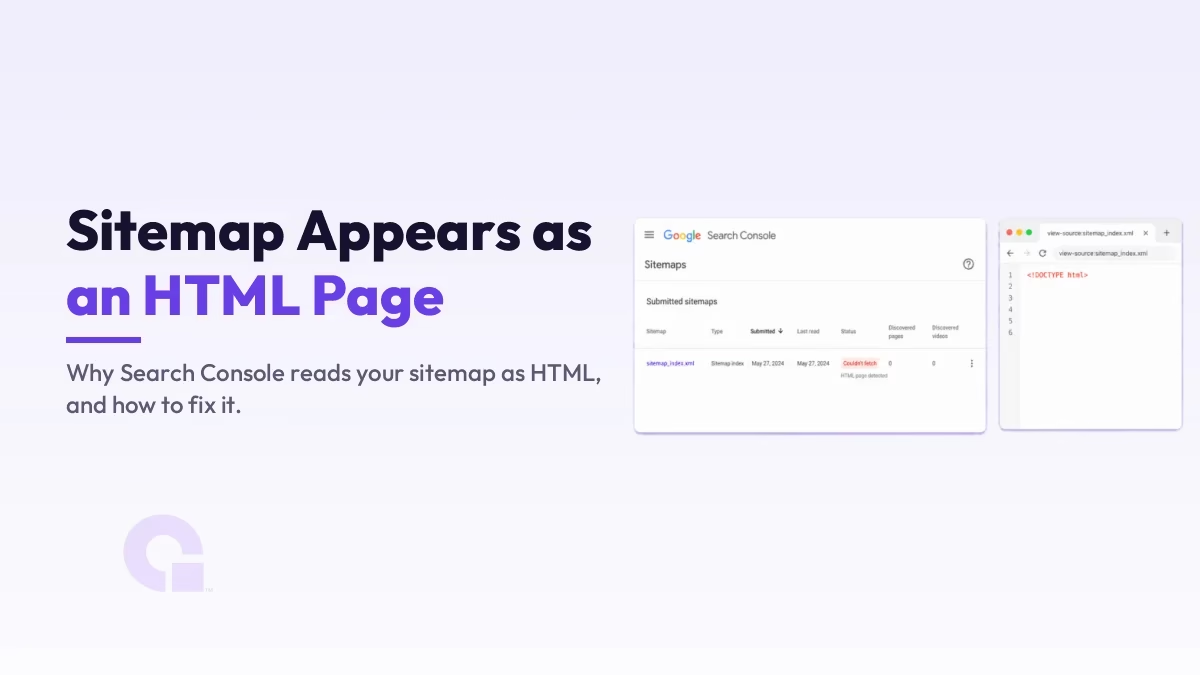
If Google Search Console keeps telling you “Your Sitemap Appears to Be An HTML Page,” it means Google asked for your sitemap and got a normal web page back instead of the XML it expects. The sitemap is not really broken in most cases; something between Google and your XML file is handing over the wrong thing.
Once you know that, the fix is methodical rather than mysterious: confirm you submitted the real XML URL, then work out what is intercepting it (usually a cache, a plugin, or a theme) and stop it. Here is how I work through it.
Key Takeaways
- The error means Google received HTML where it expected an XML sitemap, not that your site is broken.
- The fastest check is to open the sitemap URL and view source: real sitemaps start with XML tags, not
<!DOCTYPE html>. - The usual culprits are a wrong URL, a caching plugin, a CDN like Cloudflare, or a plugin or theme intercepting the route.
- Fix the cause, then purge every cache layer (plugin and CDN) before you resubmit, or you will keep seeing the old HTML.
- If nothing else works, regenerate the XML from your SEO plugin and submit the correct index URL.
What the error actually means
Search engines read XML sitemaps, a machine-readable list of your URLs, not the human-friendly HTML pages your visitors see. When Google fetches the URL you submitted and the response comes back as HTML, it cannot parse it as a sitemap, so it flags it with this message.
The quickest way to see what Google is seeing is to open the sitemap URL in your browser, right-click, and choose View Page Source. A healthy sitemap starts with an XML declaration and <urlset> or <sitemapindex> tags; if instead you see <!DOCTYPE html> and page markup, you have confirmed the problem in ten seconds.
Why it happens
There are only a handful of real causes, and naming the right one saves you from guessing. The table below pairs each cause with a quick way to confirm it and the fix that follows.
| Likely cause | How to confirm it | The fix |
|---|---|---|
| You submitted an HTML page, not the XML | Open the URL; it looks like a normal web page | Submit the real XML, usually sitemap_index.xml or wp-sitemap.xml |
| A caching plugin served a cached HTML copy | View source shows HTML even though the file is XML | Exclude the sitemap URL from the cache, then purge it |
| Cloudflare or a CDN cached the wrong response | Still HTML in view-source after the plugin fix | Purge the CDN cache and bypass caching for the sitemap path |
| A plugin or theme is intercepting the sitemap route | The error clears when you switch theme or disable a plugin | Replace the bad plugin or theme, or fix its sitemap handling |
| The server returns a styled error page with a 200 status | A 404 or 403 page loads but reports success | Make the server return real XML with the correct content type |
How to fix it, step by step
Work through these in order; most sites are sorted by the second or third step.
1. Verify the URL you submitted
Start with the cheapest fix. Make sure the URL in Search Console points at your actual XML file, not a page or a typo, because a single wrong character sends Google to the wrong place. On most WordPress sites it is one of these:
- https://example.com/sitemap_index.xml (the standard SEO-plugin index)
- https://example.com/wp-sitemap.xml (WordPress core)
- https://example.com/post-sitemap.xml or page-sitemap.xml (the child sitemaps)
2. Exclude the sitemap from your cache
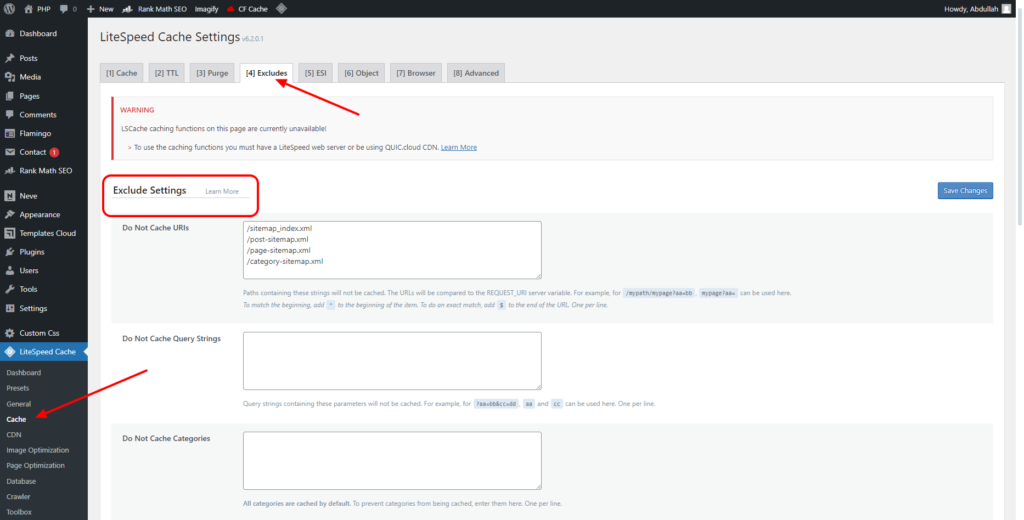
This is the most common real cause. A caching plugin can store an HTML version of the response and serve that to Google, so add your sitemap URL to the plugin’s cache-exclusion list and clear the cache. In LiteSpeed Cache, for example, you drop the sitemap path into the do-not-cache list, as shown below.
3. Purge your CDN or Cloudflare cache
This is the step people forget, and then nothing works. If you run Cloudflare or any CDN, it can keep serving the old HTML response long after you fix the plugin, so purge the CDN cache too, and if you can, add a rule to bypass caching for the sitemap path. Always clear the CDN both before and after your changes, or you will be testing against a stale copy.
4. Rule out a plugin or theme conflict
If the response is still HTML, something is hijacking the sitemap route. Deactivate your plugins one at a time, or switch temporarily to a clean theme like Twenty Twenty-Four, GeneratePress, or Kadence, and recheck the URL after each change. I once chased this exact error for a client and it turned out to be a badly coded theme rewriting the request; swapping the theme fixed it instantly, so do not rule the theme out just because it seems unlikely.
5. Regenerate the sitemap and resubmit
Once the URL returns clean XML in view-source, regenerate the file so it reflects your current content, then resubmit it in Search Console. Most SEO plugins rebuild the XML for you, Yoast included, and the one I reach for is Rank Math.
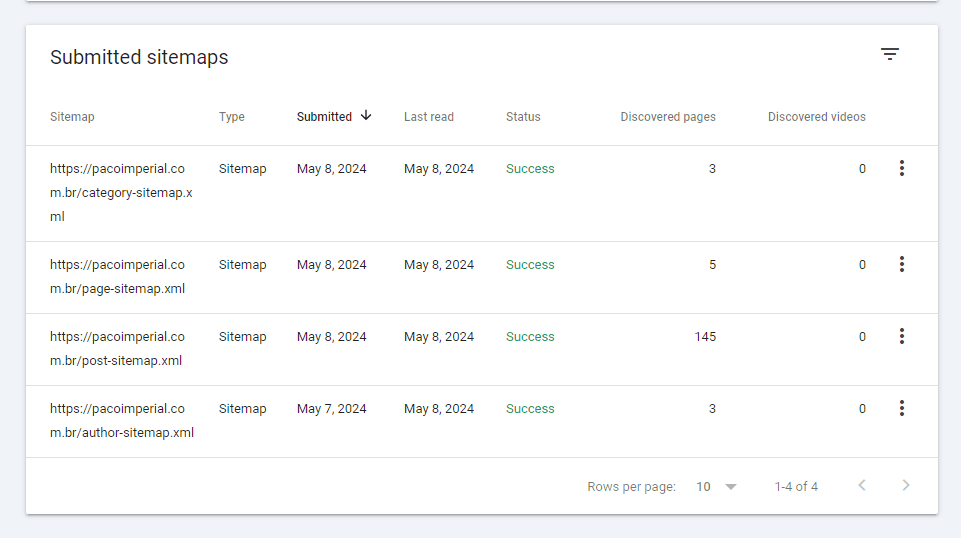
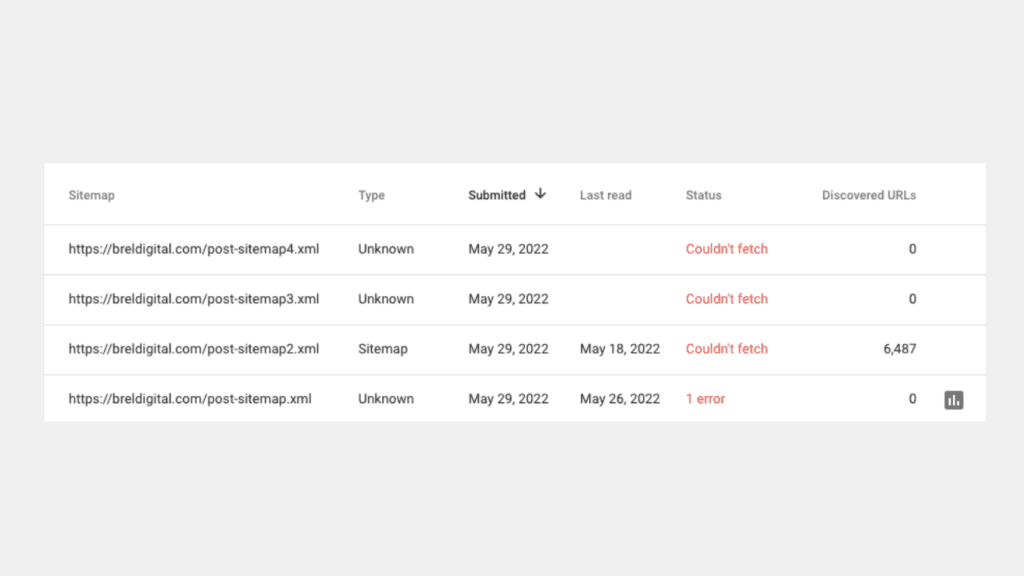
Google may take a little while to re-fetch, so after it reads the corrected file the status flips to success, like the example above. If you would rather build the file yourself, my guide on creating an XML sitemap manually walks through that, and if Google reports a different message, the sitemap couldn’t fetch fix covers the close cousin of this error. Google’s own documentation on building a sitemap and the Sitemaps report are worth a glance if you want the formal reference.
So, is this error worth worrying about?
If this were my site, I’d fix it quickly but not panic over it. A sitemap Google cannot read does slow down how fast it discovers new and updated pages, and on a large or frequently changing site that genuinely matters, so it is worth getting right rather than leaving flagged for months.
That said, it is almost always a configuration issue, not a penalty or a damaged site, and the cache layers are the usual offenders. Work the steps in order, purge every cache before you retest, and watch the wasted crawling stop; if you want to see exactly how a clean sitemap helps Google spend its effort well, that ties straight into managing your crawl budget.
Still stuck on the sitemap error?
If you have worked through every step and Google still reads your sitemap as HTML, contact us or email me and I will take a look. A sitemap Google can read cleanly is the baseline for healthy indexing, so it is worth getting right.
Update Logs
29 Jun 2026
- Rewrote the fix as an ordered diagnosis, added a view-source check and a causes-and-fixes table, and made the cache and CDN purge steps explicit, since that is what trips most people up.
Want our posts to show up more often on Google?
One step & Google will surface this site in your Top Stories.