Crawl budget gets talked about like a dial you should be tuning every week, but for most sites it is not the lever people think it is. It is really two things working together: how much Googlebot can crawl your server without straining it, and how much it wants to crawl based on how popular and how fresh your pages are.
Below I will show you where to find your crawl stats in Search Console, how to read them, and, more importantly, whether you even need to care; because the honest answer for a normal WordPress site is usually “not much.”
Key Takeaways
- Crawl budget is two things at once: how much Googlebot can crawl (your server’s capacity) and how much it wants to crawl (demand from popularity and freshness).
- Most sites do not need to manage it; Google says it mainly matters for very large or fast-changing sites.
- You find it under Settings, then Crawl stats in Search Console, which shows total requests, average response time, and host status over 90 days.
- The real win is not chasing “more” crawl budget; it is stopping Google from wasting it on junk URLs, soft 404s, and redirect chains.
- For a normal WordPress site, fast hosting, a clean sitemap, and no infinite URL spaces cover almost everything that matters.
What crawl budget actually is
The cleanest way to think about it, and the way Google itself frames it, is as a combination of two limits. The first is your crawl capacity limit: how many connections Googlebot can open to your site before it risks slowing your server down, which is why a fast, healthy host gets crawled more freely than a sluggish one.
The second is crawl demand: how much Google actually wants your pages, driven by their popularity and how often they change. A page nobody links to and never updates simply does not earn many return visits, no matter how much server headroom you have. Put the two together and you have your real crawl budget, which is why “just buy a bigger server” does not move the needle on a site Google has little demand for.
Do you even need to worry about it?
Here is the part most crawl-budget posts quietly skip. Google’s own guidance on managing crawl budget is aimed at large sites, the kind with hundreds of thousands of pages or sections that change daily. If you run a blog, a small store, or a local business site, Googlebot can almost certainly crawl everything you have without breaking a sweat.
So if your pages are slow to get indexed, crawl budget is rarely the culprit; weak internal linking, thin content, or a noindex left in by accident usually is. I am not saying ignore the report, because it is genuinely useful for spotting server trouble, but I would not lose sleep over “optimizing” a budget that is already more than enough for your page count.
How to find your crawl stats in Search Console
First, log in to Google Search Console and make sure the site you want is verified. The crawl data is tucked away where people rarely look, so the path matters.
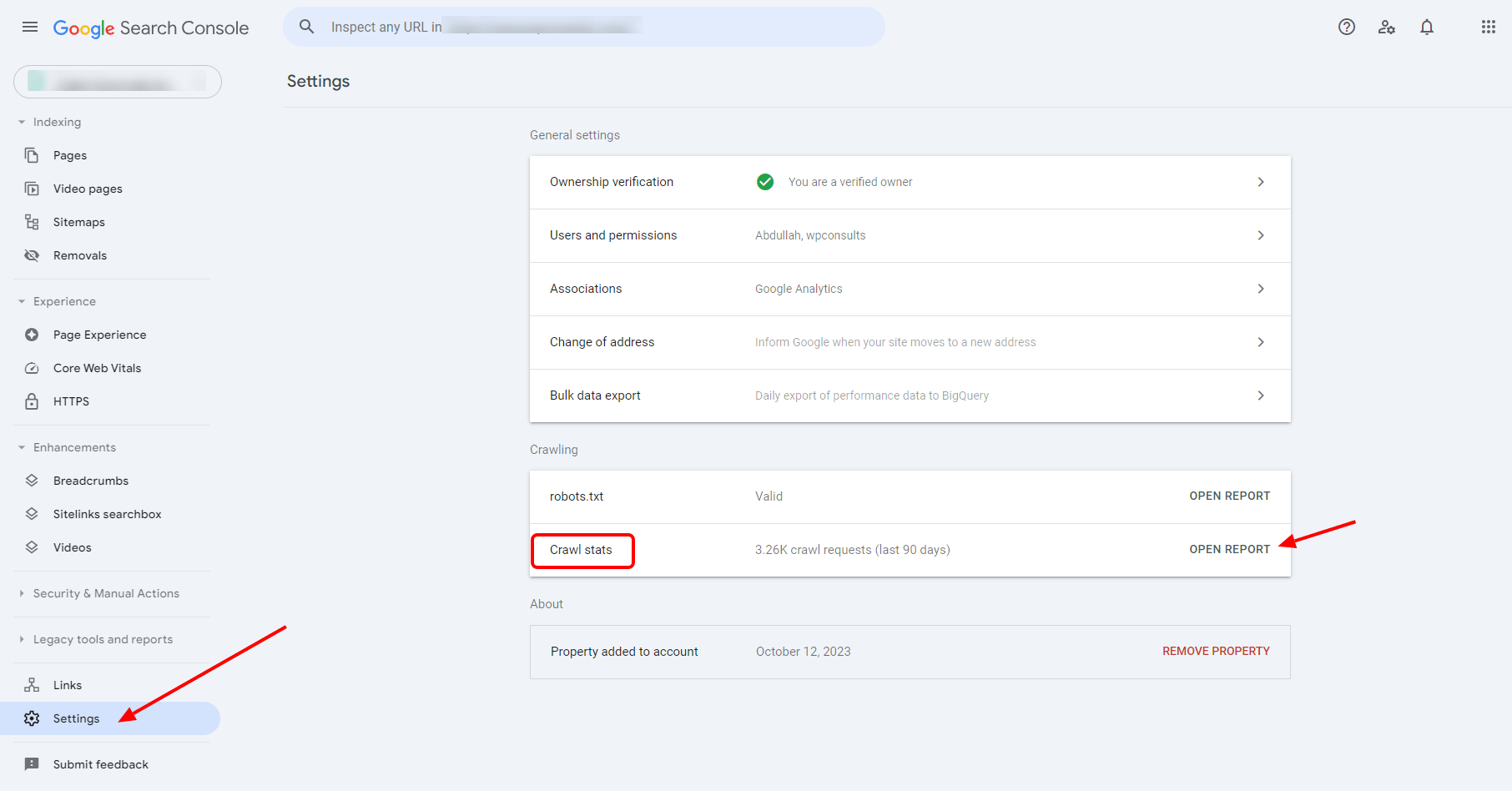
Scroll to the bottom of the left-hand menu and click Settings, then open the Crawl stats section. That report covers the last 90 days and is the only first-party view Google gives you of how its bots are actually hitting your site.
How to read the Crawl Stats report
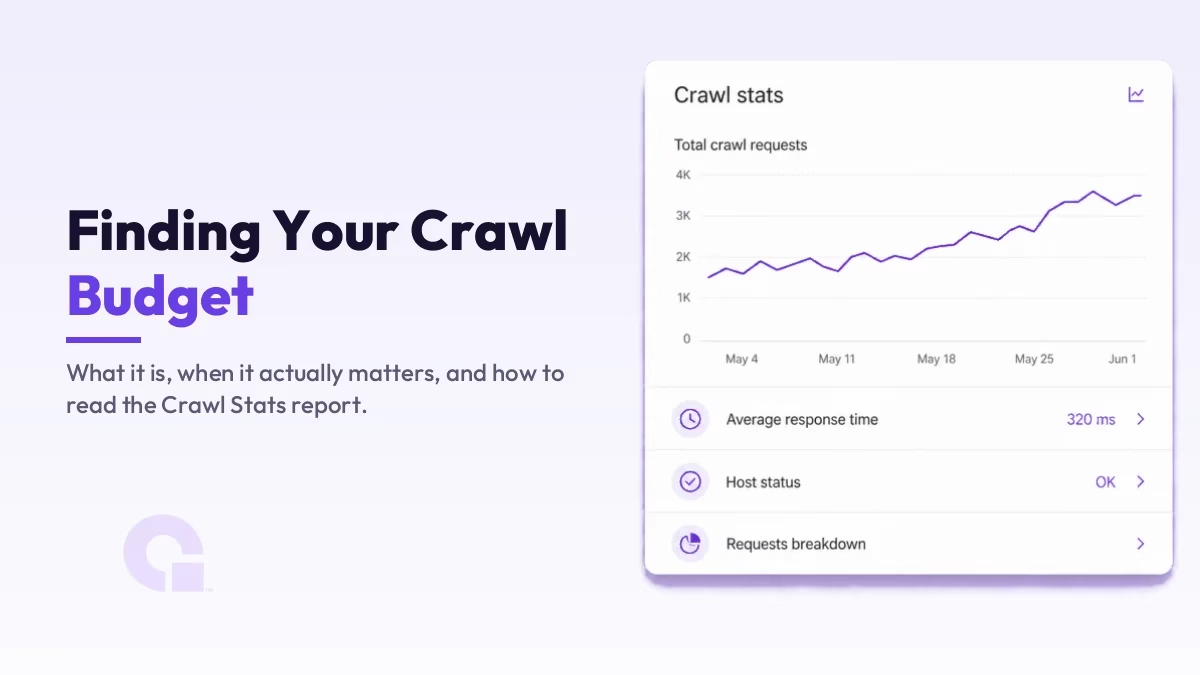
Once it loads, a handful of numbers tell you most of what you need. Total crawl requests is how often Googlebot fetched something; average response time is how quickly your server answered, which ties straight back to that capacity limit; and host status flags whether Google ran into availability problems while crawling.
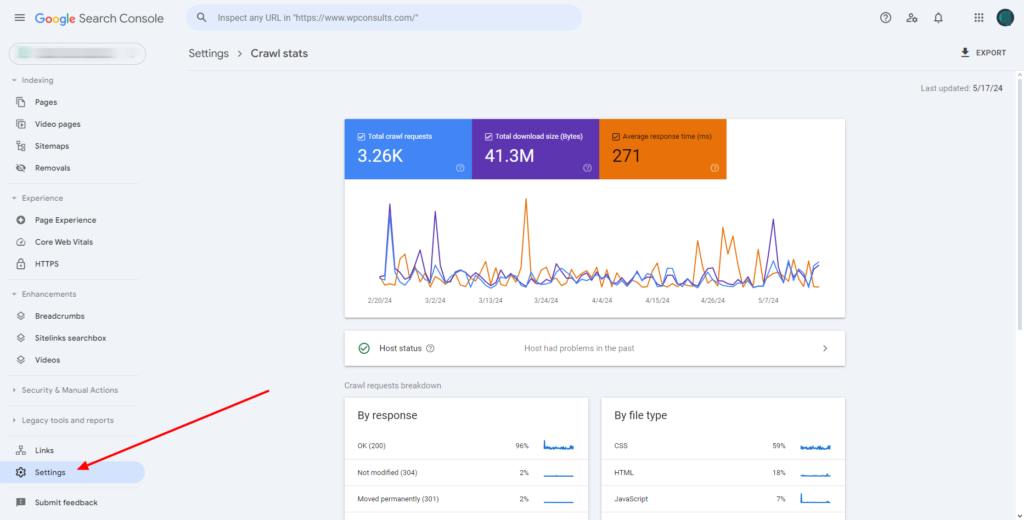
The part worth your attention is the requests breakdown, which splits crawls by response (200s, 301s, 404s, server errors), by file type, and by Googlebot type. If you see response time climbing or a wall of 404s and redirects, that is Google telling you where its effort is leaking, and it is far more actionable than the headline number. Google’s Crawl Stats documentation breaks down every category if you want the full reference.
Where crawl budget actually leaks
When crawl budget genuinely is a problem, it is almost always because Google is burning it on URLs that should never have been crawlable. The usual offenders are faceted navigation and filter parameters that generate near-infinite combinations, session IDs in URLs, soft 404s that return a 200 status on an empty page, and long redirect chains that make Googlebot take three hops to reach one page.
Duplicate content is the other big drain, because every duplicate URL is a page Google crawls without getting anything new in return. If you want to see exactly which bots are spending time where, your raw server logs are the only fully honest record; Search Console summarizes, but the logs show every request.
What to do about it
The fixes follow straight from the leaks, and each one has a reason behind it rather than being a box to tick. Block the infinite spaces (faceted URLs, internal search results, parameter junk) in robots.txt so Googlebot stops wandering into them, and clear out soft 404s and broken links so its requests land on real pages instead of dead ends.
Keep your XML sitemap clean and current, listing only the canonical URLs you actually want indexed, because the sitemap is one of the strongest hints Google uses to prioritize. I have watched sites lose almost all their traffic except the home page because a plugin quietly broke the sitemap and nobody checked for weeks, so if you notice anything off there, treat it seriously; the sitemap errors guide covers the common ones. Then make sure your hosting is quick, since a faster response time directly lifts the capacity side of the budget.
So, should crawl budget be on your radar?
In my view, for the large majority of sites the answer is a calm “check it, do not obsess over it.” Open the Crawl Stats report now and then to catch server problems and 404 spikes early, but if you have a few hundred or a few thousand pages, your budget is almost certainly fine and your energy is better spent on content and internal links.
Crawl budget earns real attention once you cross into large-site territory, or when faceted navigation and parameters start spawning URLs faster than Google can keep up. Until then, fast hosting, a clean sitemap, and no infinite URL spaces will quietly handle nearly all of it, which is a far better use of your time than tuning a number that was never holding you back.
Update Logs
29 Jun 2026
- Reworked the guide to separate crawl capacity from crawl demand, added a clear take on when crawl budget actually matters, and refocused the fixes on where it really leaks (faceted URLs, soft 404s, redirect chains).
Want our posts to show up more often on Google?
One step & Google will surface this site in your Top Stories.