Edge Side Includes (ESI) is the LiteSpeed Cache feature that lets you “punch holes” in a publicly cached page, so the parts that are personal (an admin bar, a logged-in greeting, a cart, a login form) stay dynamic while the rest of the page is still served from cache. That is how a logged-in visitor can be served a cached page at all.
Below I explain what each ESI setting actually does, the prerequisite most guides get wrong (ESI needs a commercial LiteSpeed product; the free OpenLiteSpeed cannot run it), and my honest take on when ESI is worth turning on and when it just adds complexity.
Key Takeaways
- ESI “punches holes” in a cached page and fills them per visitor, so logged-in users can still be served from cache instead of bypassing it.
- ESI needs LiteSpeed Web Server Enterprise, LiteSpeed Web ADC, or QUIC.cloud CDN. The free OpenLiteSpeed does not support ESI, and the plugin alone on Apache or Nginx will not do it either.
- Enable ESI is the master switch; Cache Admin Bar and Cache Comment Form turn those two common dynamic blocks into ESI fragments.
- ESI Nonces keep secure tokens valid inside cached pages; Vary Group serves different cache versions to different user roles.
- ESI pays off most on sites with many logged-in users (membership, WooCommerce accounts, forums); on a simple blog it usually adds more debugging than benefit.
What ESI actually does
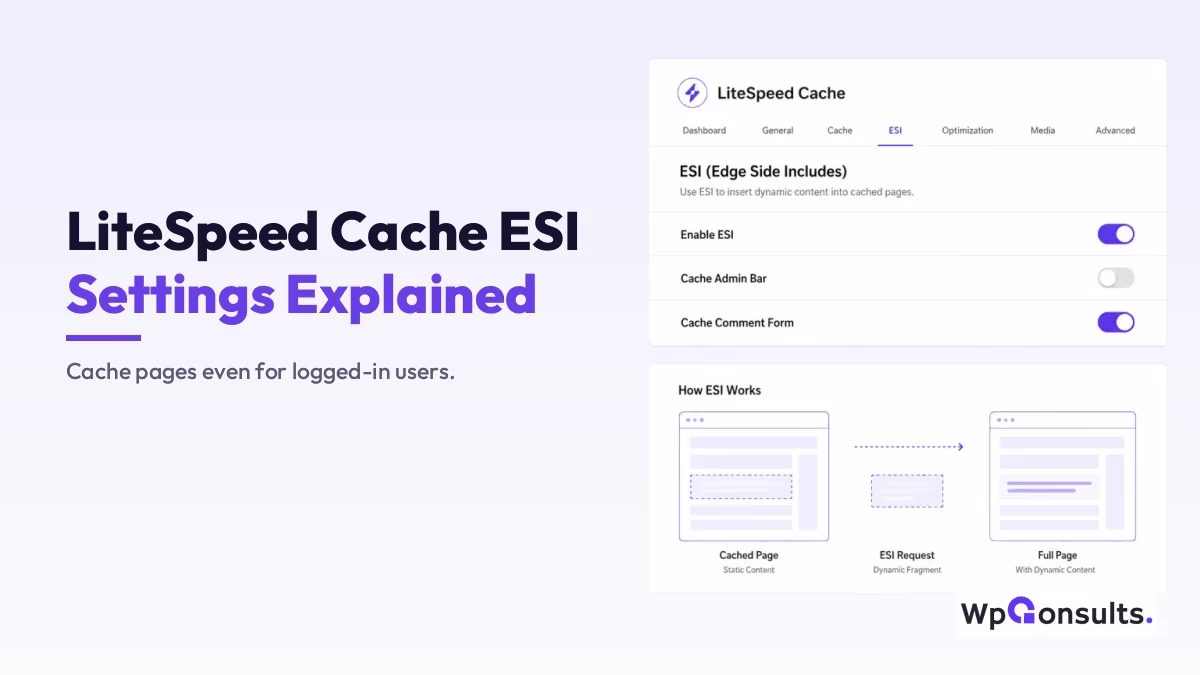
Normally, full-page caching and personalized content fight each other: the moment a page shows something user-specific, like “Hi, Abdullah” or an edit link, you cannot safely serve one cached copy to everyone. ESI solves that by cutting the page into pieces. The static body is cached and reused across all visitors, while the personalized pieces are marked as separate fragments and assembled on the fly.
LiteSpeed’s own phrase for this is punching holes in the cached page: it serves the fast cached copy but leaves small holes where the dynamic content goes, then fills those holes per request. The holes are the things that cannot be shared between visitors, typically the admin bar, a shopping cart, a login form, or a security token.
The concept is not LiteSpeed’s invention. It is an old web standard described in the W3C ESI specification; LiteSpeed just gives WordPress a friendly way to use it.
Why ESI matters, and when it does not
The real win is performance for logged-in users. On most caching setups, logged-in visitors bypass the cache entirely and hit PHP and the database on every page, which is exactly the slow path you were trying to avoid. ESI lets those users still be served the cached page, with only their personal fragments computed fresh, so a membership site or a store with logged-in customers feels far snappier and the server does much less work.
That said, I want to be balanced here, because ESI is not a free upgrade for every site. It adds moving parts: more fragments to invalidate, more edge cases when a plugin renders something unexpected, and more time spent debugging a stale block.
If your site is a brochure site or a blog where almost everyone is a guest, plain full-page caching already serves them instantly and ESI buys you very little. It earns its keep when a meaningful share of your traffic is logged in, which is the same reason it shows up in serious scaling conversations like whether WordPress can handle a million-plus visitors.
Which servers support LiteSpeed ESI (OpenLiteSpeed does not)
ESI requires a commercial LiteSpeed product: LiteSpeed Web Server Enterprise, LiteSpeed Web ADC, or QUIC.cloud CDN. The free OpenLiteSpeed does not support ESI at all, and neither does the plugin running on plain Apache or Nginx. This is the prerequisite most tutorials get wrong, and I had it wrong on this page too until I checked the documentation properly.
It comes straight from LiteSpeed’s own LiteSpeed Cache documentation, which states it plainly:
“OpenLiteSpeed does not support ESI functionality. You will need LiteSpeed Web Server Enterprise, LiteSpeed Web ADC, or QUIC.cloud CDN in order to use ESI and any of the functionality in this tab.”
The reason is architectural, not commercial spite. ESI is assembled by the web server, not by PHP, so the server itself has to understand the ESI tags and stitch the fragments together. OpenLiteSpeed simply does not ship that engine.
So before you touch any of these settings, check what your host actually runs. If you are on OpenLiteSpeed, the ESI tab will look available in the plugin and will quietly do nothing for you, which is exactly the sort of thing that costs an afternoon. QUIC.cloud is the escape hatch worth knowing about: it can handle ESI at the edge, so an OpenLiteSpeed site can still get there by routing through it.
If speed is a priority when you pick a host, my roundup of fast WordPress hosting providers goes deeper, and a solid LiteSpeed option I often recommend is Hostinger.

Walking through the LiteSpeed Cache ESI settings
You will find these under LiteSpeed Cache > Cache > ESI. The panel is short, but each toggle has a clear job.
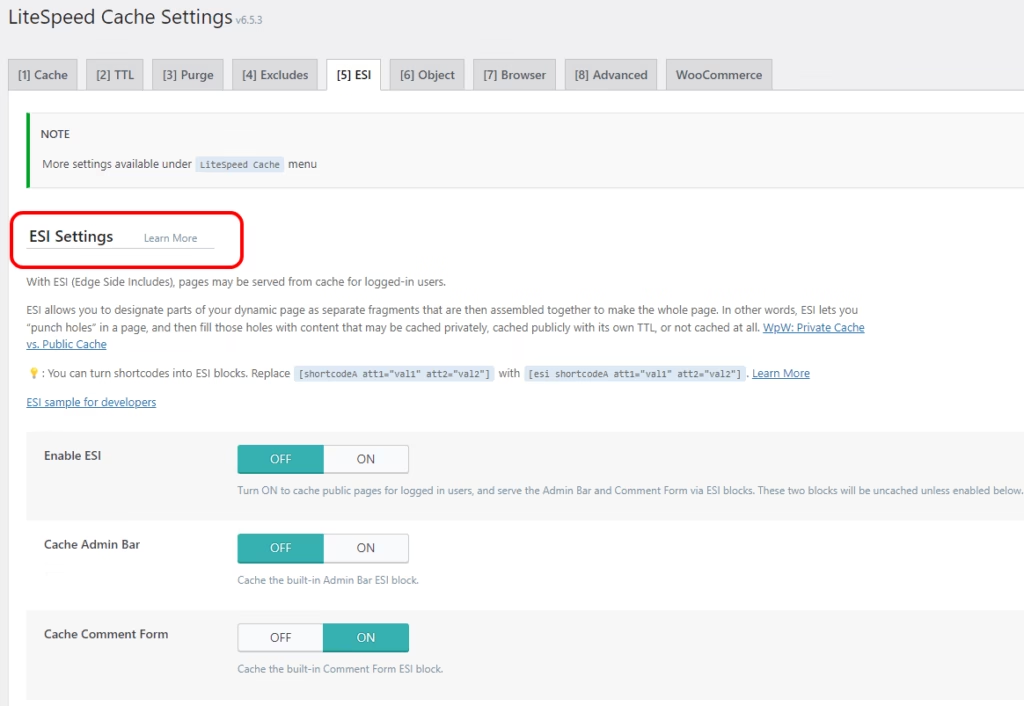
Enable ESI is the master switch. With it off, none of the rest applies. Turn it on and LiteSpeed can begin caching public pages for logged-in users by treating personal pieces as separate fragments, which is the whole point of the feature.
Cache Admin Bar turns the WordPress toolbar that logged-in users see into its own ESI block. Without this, that bar would force the page to render dynamically every time; as a fragment, the rest of the page stays cached and only the bar is handled separately.
Cache Comment Form does the same for the comment form, which carries a per-user security token, so it keeps the form working without dragging the whole page out of cache.
ESI Nonces
A nonce is a short-lived security token WordPress uses to make sure a form or action genuinely came from your site. The problem is that a cached page would serve a stale, expired nonce to everyone, breaking the action.
The ESI Nonces box fixes this: you list the nonce names (one per line, for example stats_nonce or subscribe_nonce), and LiteSpeed serves each as a fresh fragment so the token stays valid inside an otherwise cached page.
You can append private after a nonce name to cache it per user, and you can use a wildcard like nonce_formid_* to match a family of nonces at once. Most people never need to touch this unless a specific plugin’s secured action misbehaves under caching.
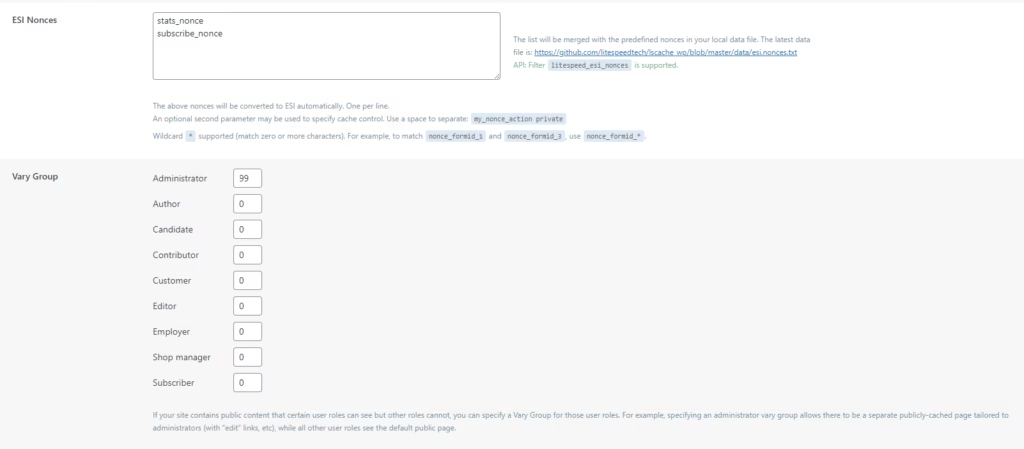
Vary Group
Vary Group controls how many separate cache versions you keep per user role. Each role gets a group ID: give a role a distinct number, say 99 for Administrator, and that role gets its own cached version with its admin-specific elements, while roles left at 0 share the default public cache.
The point is to stop cache contamination, where one role accidentally sees another role’s cached view. In practice you mostly separate admins or editors from everyone else; splitting every role into its own group multiplies your cache copies for little gain, so keep the groups few.
Turning a shortcode into an ESI block
Beyond the toggles, you can mark any piece of output as dynamic yourself. If a shortcode renders per-user content, you prefix it with esi so LiteSpeed treats it as a fragment:
[esi shortcodeA attr1="val1" attr2="val2"]That tells LiteSpeed to cache the page but compute this one shortcode fresh each time. For developers, the official LiteSpeed Cache documentation shows how to register custom ESI blocks in code, which is where the real flexibility lives.
So should you enable ESI?
In my view, enable ESI if a real share of your visitors log in, a membership site, a community, a WooCommerce store where customers browse signed in, because that is where caching for logged-in users turns a sluggish experience into a fast one and takes genuine load off the server.
Start with just Enable ESI plus Cache Admin Bar and Cache Comment Form, test that personalized areas still behave, and only reach for Nonces or Vary Group when a specific plugin needs it.
If your site is mostly guests, I would not bother; plain full-page caching already serves them instantly, and ESI would only add fragments to debug. And before any of that, check the server: on OpenLiteSpeed this whole tab is decoration. Treat ESI as one lever among several, alongside the basics that actually move your Core Web Vitals. Used in the right place it is excellent; used everywhere by reflex it is just complexity.
Update Logs
12 Jul 2026
- Correction: this post previously said ESI works on OpenLiteSpeed. It does not. LiteSpeed’s own documentation states that ESI requires LiteSpeed Web Server Enterprise, LiteSpeed Web ADC, or QUIC.cloud CDN, and is not supported on OpenLiteSpeed. The server requirement is now stated correctly and quoted from the source, and QUIC.cloud is named as the route an OpenLiteSpeed site can actually use.
27 Jun 2026
- Rewrote with the LiteSpeed-server prerequisite made explicit, a clearer explanation of each setting, and an honest verdict on when ESI is worth enabling versus when it just adds complexity.
Want our posts to show up more often on Google?
One step & Google will surface this site in your Top Stories.