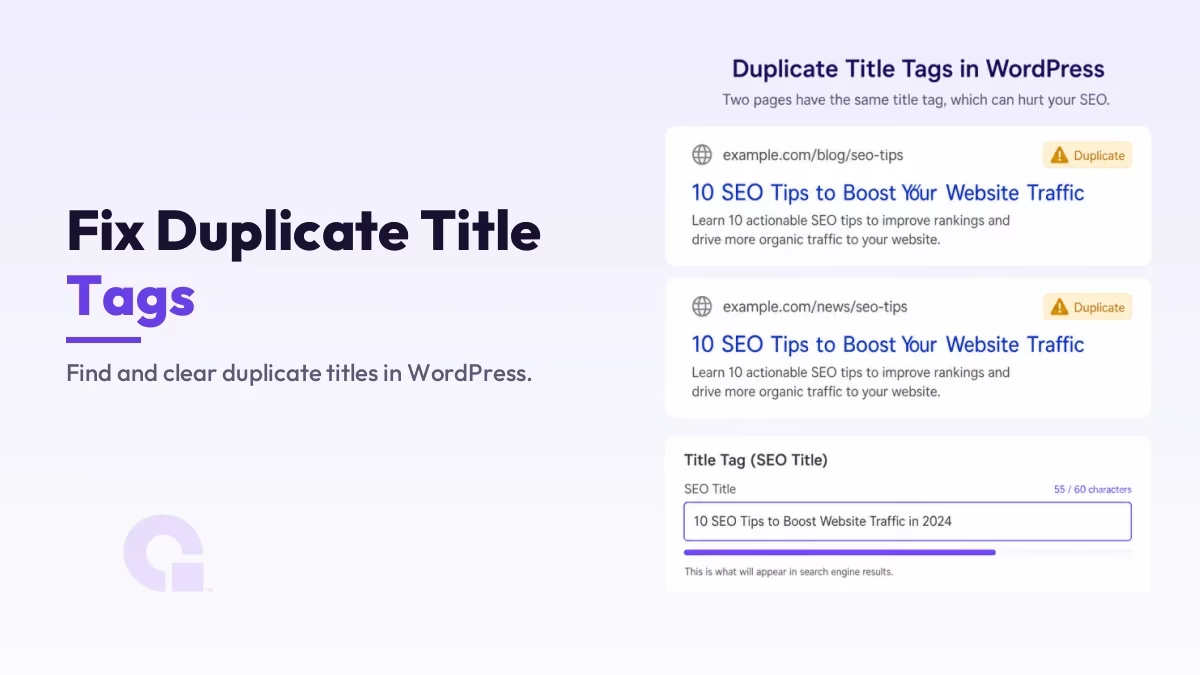
Duplicate title tags hurt your SEO because two or more pages carry the exact same <title> text, so Google has to guess which one you wanted ranking. On WordPress, most of them are not pages you wrote twice; they are extra URLs the platform generated for you.
This guide covers how to get the real list of duplicate titles, how to tell one that matters from an archive that does not, and which fix each cause needs. One warning first: Search Console has no report that lists duplicate titles, so the common advice to go and check the Page indexing report will not hand you anything.
Key Takeaways
- Duplicate title tags are two or more pages sharing identical
<title>text, so Google cannot tell which of them is the better match and picks one for you. - On WordPress the usual sources are generated URLs: category, tag and author archives, paginated pages, and parameter or filter URLs.
- Search Console has no site-wide duplicate-title report. I went through the current report list on my own property on 19 August 2026 and there is nothing in it that returns a list of duplicate titles.
- A crawl is the practical way to get a list of your duplicate titles. Screaming Frog flags duplicate and missing titles, up to 500 URLs on its free version, and your SEO plugin’s own analysis will surface them too.
- Aim for roughly 50 to 60 characters per title, and make each one describe its own page rather than repeat the site name.
- The H1 is the big headline printed at the top of the page itself, and it is a different tag from the title Google shows in search results. A duplicate H1 usually comes from your theme template rather than your SEO plugin.
- Seven steps clear almost every case: write unique titles on real pages, ask why two real pages needed the same title, set dynamic title templates, add a page number to paginated archives,
noindexthe archives nobody searches for, set a canonical where the duplicate has to stay, and 301 the one that should not be live. - Searching the bare phrase duplicate title tags also returns vehicle title results, so add seo or wordpress to your search.
What are duplicate title tags, and why do they hurt your rankings?
A duplicate title tag is when two or more URLs on your site carry the identical <title> text, which is the meta title Google usually shows as the clickable headline in search results. It hurts because the title is one of the clearest signals of what a page is about, and identical titles make that signal ambiguous.
Two things follow from that. Google may pick the page you did not want, or treat your two pages as near-equal answers so neither of them ranks as well as one strong page would.
There is a click cost on top of the ranking one. Three results with the same headline give a searcher no reason to choose yours, and a title that does not describe its own page is also more likely to be rewritten by Google before it is shown.
Honestly, duplicate titles rarely earn a penalty. They just hold those pages a little below where they could rank, which is quiet enough that the problem sits on a lot of sites for years without anyone noticing.
How do you find duplicate title tags on your site?
Crawl the site with a tool that reads every page’s title, because Search Console has no report that lists duplicate titles. Screaming Frog, Sitebulb, Semrush’s Site Audit or your SEO plugin’s own site analysis will each give you that list in one pass, and that is the step most guides get wrong.
I checked rather than assumed. Here is every report Search Console currently offers on my own property, opened on 19 August 2026.
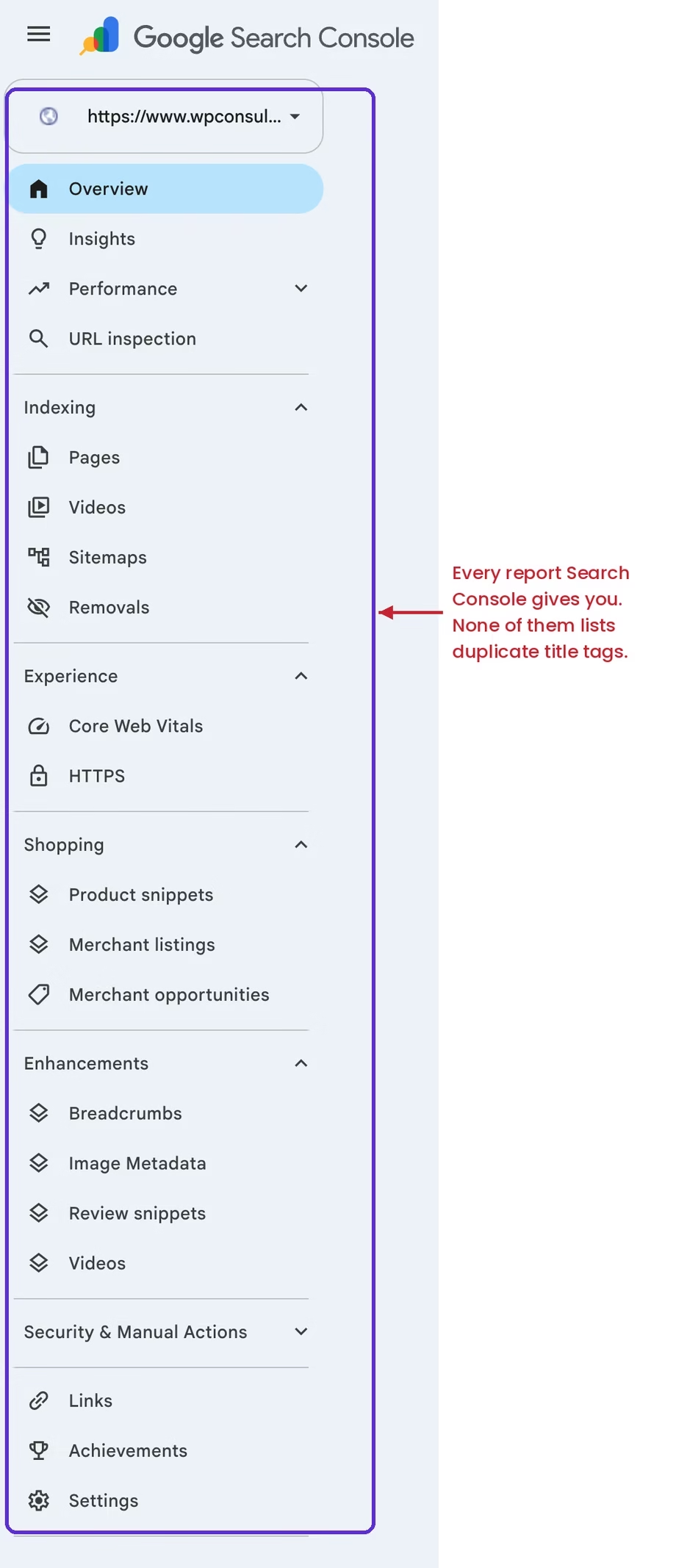
So the routes that actually work, in the order I would try them:
- Run a crawler. Screaming Frog’s free version has a 500 URL crawl limit and includes page title analysis, which covers most WordPress blogs outright. It flags duplicate titles as their own filter rather than making you read a spreadsheet.
- Check your SEO plugin’s site analysis. If you already run one, its audit usually reports duplicate and missing titles, so you may have the list without installing anything new.
- Use the Search Console Performance report as a cross-check, not as the source. Open Performance, click a query you care about, then switch to the Pages tab and see whether two of your URLs come back on it. Two URLs on one query is a hint that something overlaps, not proof that their titles match, so treat it as a lead.
That third step needs care, because it produces false positives. I ran it on my own property over the 28 days to 18 August 2026 and did find a query returning two of my URLs, about wp, which brought back an English page and its French translation.
Those two pages carry different titles in different languages, so that pair is doing exactly what it should and is not a duplicate title at all. Open both URLs and read the actual titles before you decide you have found something.
If the two URLs turn out to be genuine competitors rather than a language pair, that is a different job. Another post of yours, one of your own archive pages, your own article republished elsewhere, or a stranger can each sit above your page, and I worked through how to tell which one you have in the keyword cannibalization audit.
What should you do if your pages have duplicate H1 and title tags?
Treat a duplicate title and a duplicate H1 as two separate problems, because the two tags are written in two different places. The title tag is the headline Google prints in the search results and comes from your SEO plugin’s title template; the H1 is the big headline printed at the top of the page itself and comes from your theme template.
So one fix almost never clears both, and the tools that report them are usually different too.
The order that saves time is title first, H1 second. Fixing the title template is a settings change that clears dozens of URLs at once, while the H1 usually needs a template edit or a theme setting.
Where the two genuinely overlap is on your archive pages. A category archive tends to print the category name as both its H1 and its title, and every paginated page under it repeats the pair, so adding the page number to the title template separates the titles even though the H1s stay identical.
Keep that in perspective, though. A repeated H1 across your own archive pages is normal and not worth chasing; the case worth fixing is two real content pages carrying the same H1, because that usually means they were written to answer the same question.
Why does WordPress create duplicate titles in the first place?
WordPress creates duplicate titles because it generates URLs you never made. Every category, tag and author gets an archive page, every archive gets split into numbered pages, and each of those pages pulls its title from a template rather than from anything you typed.
Knowing the source tells you which fix to reach for, so it helps to match each cause to its remedy.
| Common cause | What happens | The fix |
|---|---|---|
| Category, tag, and author archives | Archive pages with little of their own content reuse the same title pattern | Add noindex to the ones nobody searches for, which keeps them out of Google, or give them unique titles |
| Paginated archives (page 2, 3…) | Each page repeats the archive’s title | Add the page number to the title template |
| Parameter and filter URLs | Sorting or filters create duplicate URLs | Set a canonical tag pointing at the clean URL, so Google credits that one |
| Misconfigured SEO plugin | A broken title template outputs the same title | Fix the title template variables |
| An old page you replaced but never removed | Both the old page and its replacement are live under the same title | 301 redirect the old one to its replacement |
How do you fix duplicate title tags in WordPress?
Rewrite the handful of real pages by hand, then let a title template handle every page WordPress generated. Doing it in that order means you edit a few titles yourself and clear the rest with one setting, instead of rewriting dozens of titles that will come straight back.
- Give every real page its own title. Build it around that page’s own keyword and keep it to roughly 50 to 60 characters, which is the length that usually survives without being cut off. Google’s guidance asks for descriptive titles and warns against extremely long ones rather than naming a number, so treat that range as a convention rather than a rule.
- Ask why two real pages needed the same title. Almost always they were written to answer the same question, which is a content problem, and a title edit only hides it. Pick the one that should answer that question and give the other page a different job before you rename either.
- Set a dynamic title template for the generated pages. Archives, paginated pages and each post type can generate a distinct title automatically, and that one setting clears most duplicates at once. On WordPress the templates live in your SEO plugin, whether you run Yoast, All in One SEO, SEOPress or Rank Math.
- Put the page number into the paginated archive title. Page 2 of a category should not carry the same title as page 1, and the page-number variable in the template is what separates them.
noindexthe archives nobody searches for. An author archive on a one-author site, or a tag archive holding three posts, is not the answer to anybody’s search, so taking it out of the index stops it competing. If you are not sure which of your categories and tags are worth keeping in the index, I worked through that decision in WordPress categories vs tags.- Point a canonical at the clean URL where the duplicate has to stay. Filtered and sorted versions of a listing need to stay reachable for shoppers, and the canonical tells Google to credit the clean original with the ranking instead of splitting it between them. The same thinking sits behind fixing the canonical URL not in property error.
- 301 the duplicate that should not be live at all. An old page you replaced and left published is a second copy nobody needs, and redirecting it to its replacement takes it out of the results while passing on the links and ranking history it had built up.
A clean, distinct title also decides how your result reads on the search results page, and Google will rewrite a title it judges unhelpful. I covered when it does that, and what you can do about it, in title links in Google’s search results.
Lean on Google’s own guidance on title links and its advice on consolidating duplicate URLs, because both describe exactly how it treats titles and canonicals.
Shopify stores get duplicate titles from fewer sources, and two of the steps above clear them: the title template and the canonical. Collection filter URLs and tag pages are where the duplicates come from there, so you edit the title template in the theme settings and point the canonical back at the clean collection URL.
Why does searching “duplicate title tags” return DMV forms?
Because “duplicate title tags” means two completely different things and Google has not decided which one you want. A vehicle title is the legal ownership document for a car, and a duplicate title is what you apply for when you lose it.
The split is not a guess about search intent. Google’s own AI Overview, the summary it writes at the top of the results, answers the SEO question for this phrase and then offers to help with the car.
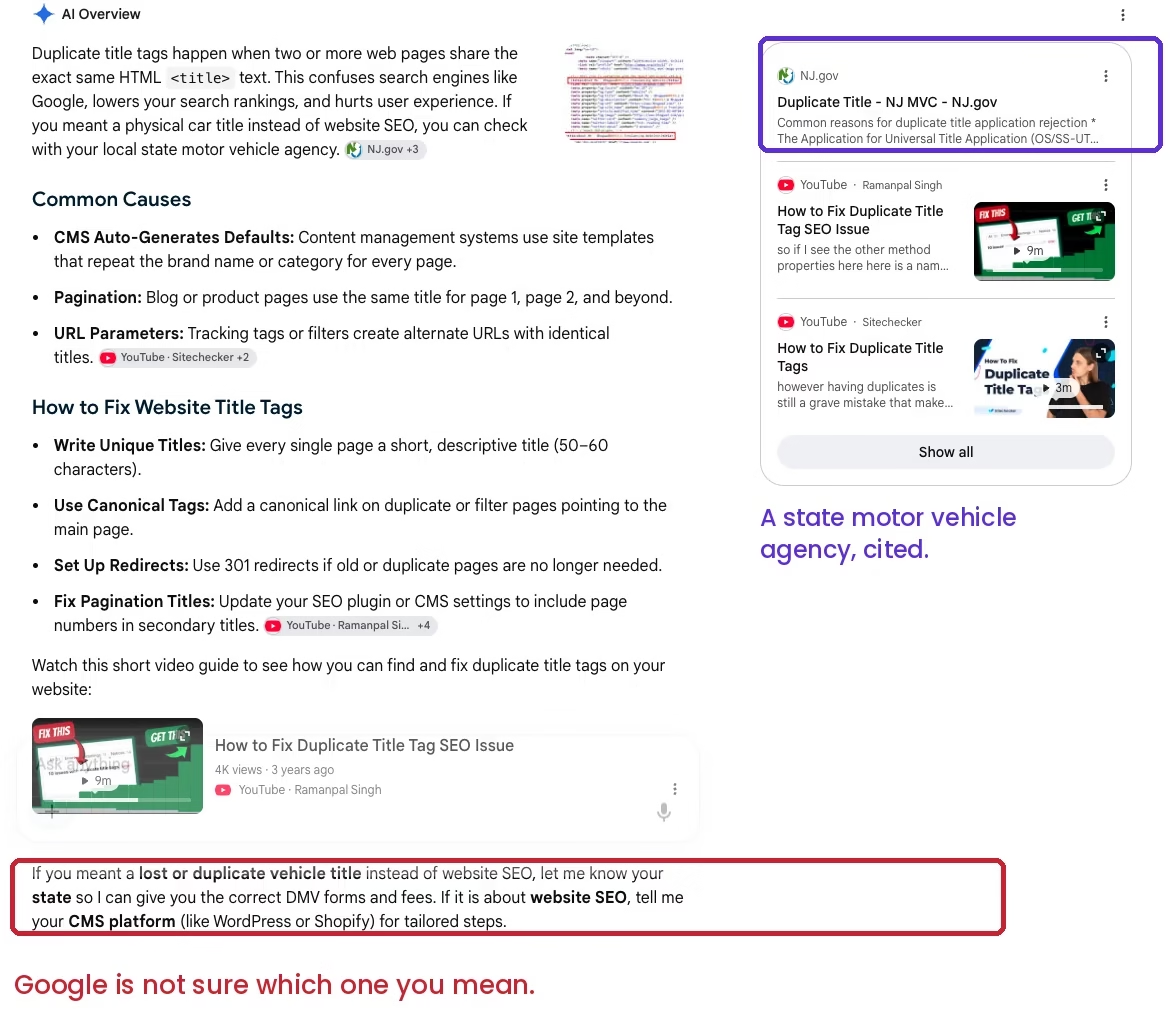
The organic results on that same search carry the split further. A state motor vehicle application page and a highway safety department PDF sit on page one alongside the SEO articles.
The practical bit is small and it saves you a lot of scrolling. Search duplicate title tags seo or duplicate title tags wordpress instead of the bare phrase, and the DMV results drop out of the page.
It is worth knowing for your own titles too. If a phrase you are targeting is split between two unrelated meanings, a title that does not say which meaning it covers leaves Google with the same problem you just had.
So what is the right way to clear duplicate titles?
In my view, fix what is producing the duplicate titles, not just the titles themselves. If two real pages share a title, that is usually a sign they overlap and one of them needs a sharper purpose or a merge, which does more for your rankings than a quick title edit.
For the archive and pagination duplicates, a good title template plus noindex on the archives nobody searches for clears the bulk in minutes.
Do not just bulk-rewrite titles and move on, because the same duplicates will reappear the next time WordPress spins up an archive. Set the templates correctly once, decide what deserves to be indexed, and the problem stays solved.
Be realistic about what you get for the work, though. Clearing duplicate titles takes away a problem that was holding pages back, but it does not make more people search for you, so the pages that move are the ones that were already close to ranking.
Stuck on duplicate titles or indexing?
Don’t hesitate to contact us or email me for a hand untangling title templates, canonicals, and indexing. Send me the URL and I will tell you what I would change first.
Update Logs
19 Aug 2026
- Corrected the section on finding duplicate titles. It used to send you to Search Console, which has no report for this, so the section now sends you to a crawl and keeps Search Console as a cross-check, with the false positive I hit on my own site written up.
- Added a section on duplicate H1s alongside duplicate titles, a redirect row in the cause-to-fix table, the practical title length, and a short note on why this phrase also returns vehicle title results.
30 Jun 2026
- Rewrote with the real WordPress causes of duplicate titles, a cause-to-fix table, and clearer guidance on title templates, noindex, and canonicals with current Google references.
Want our posts to show up more often on Google?
One step & Google will surface this site in your Top Stories.